October 4, 2026
Disposable Email Fraud in Lead Generation: What to Check
A lead that passes every basic check
Most lead forms run some kind of email validation. Is the address formatted correctly? Does the domain exist? Does it look like an email? A disposable address passes all three, which is exactly why it is so useful to anyone submitting leads they never intend to be reached at.
Temporary inbox services exist to hand out working addresses that need no signup and are abandoned within hours. For a person protecting their privacy, that is a convenience. For someone submitting fabricated leads at volume, it is a free supply of addresses that clear the first hurdle. Nobody reads the inbox, there is no way to follow up, and often there is no real person attached to the submission at all.
What email validation actually tells you
It helps to be precise about what each check proves.
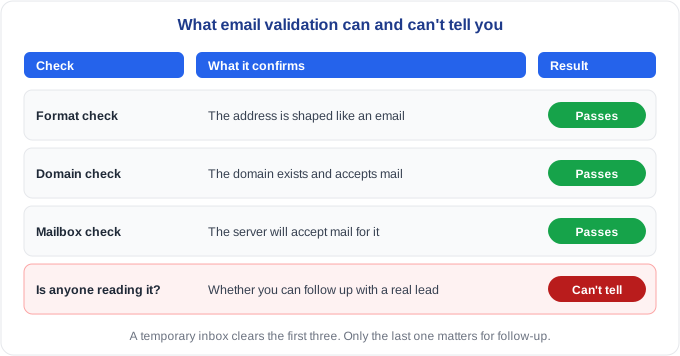
A format check confirms the address is shaped like an email. A domain check confirms the domain exists and is set up to receive mail. A mailbox check, where one is available, confirms the server will accept mail for that address. A disposable address clears all of these, because it is a genuine, working mailbox for as long as it lives.
What none of them can tell you is the thing you actually care about: whether a real person you want to reach is on the other end. That makes "is this email valid?" the wrong question. A better one is whether this address looks like something a real person would give you for follow-up.
Four kinds of unusual address
Not every odd address is a problem, and treating them all alike produces false positives. Four kinds are worth telling apart.
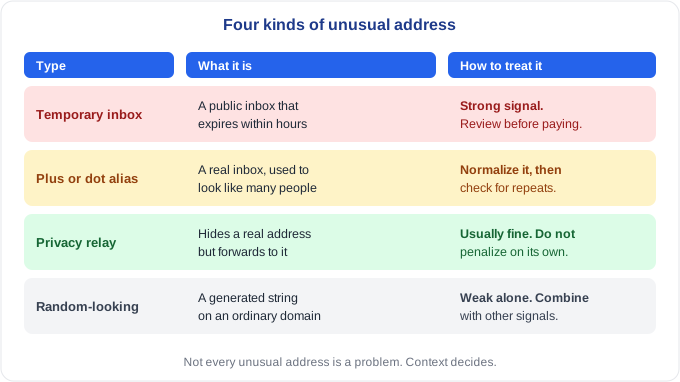
Temporary inboxes come from services designed to expire. They are the strongest signal, because the address was built not to be reachable later. Aliases are different: the inbox is real, but one person can use it to look like many. Privacy relays, built into some phones and browsers, hide a person's real address but forward mail to it, so a lead using one can still be reached. And random-looking strings are weak evidence on their own, because some real people simply have odd addresses.
The distinction matters because the right response differs. A temporary inbox deserves a review before you pay. A relay address usually does not.
One inbox, many identities
Aliasing deserves a closer look, because it is cheap and easy to miss. Many providers let you add a tag after a plus sign, so that name+anything@example.com is delivered to name@example.com. Gmail also ignores dots in the part before the @, so jane.doe and j.a.n.e.doe reach the same inbox. These are legitimate features, used by plenty of ordinary people to sort their mail.
They are also a convenient way to make one inbox look like many submitters.
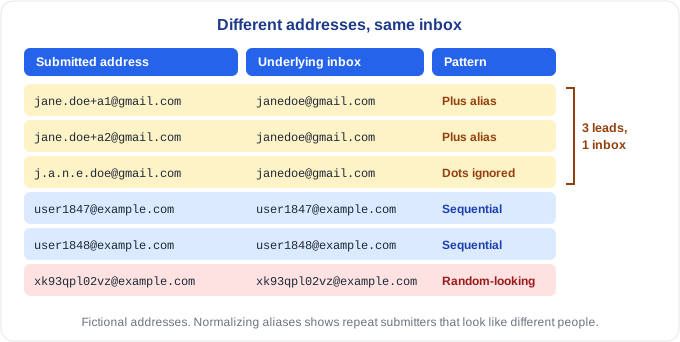
In the example, the first three leads look like three different people. Reduce them to their underlying inbox and they are one. The next two follow a sequence, user1847 then user1848, which suggests addresses produced by a counter rather than chosen by people. The last is a long random string.
The fix for aliases is normalization. Before comparing addresses for duplicates, reduce each to its underlying inbox: convert to lowercase, drop anything after a plus sign in the local part, and for Gmail addresses remove the dots. Do not apply the dot rule to other providers, where dots can matter. Once addresses are normalized, repeat submitters that looked like strangers show up as one.
Why a blocklist alone falls behind
Lists of known disposable domains are a sensible first layer, and you should use one. But they have limits. New temporary-inbox services appear regularly, and existing ones add domains to stay ahead of lists, so any static list drifts out of date. More importantly, a list only looks at the domain. Aliases and generated strings usually sit on ordinary, respectable domains and never appear on a blocklist at all.
That is why structure matters as much as the domain. How the address is built, and whether it repeats, tells you things a domain lookup cannot.
What a useful check looks at
A good email check asks several questions at once.
- Is the domain a known temporary-inbox service, using a list that is kept current?
- Does the part before the @ look generated rather than chosen?
- Does the address belong to a sequence, such as user1847 followed by user1848?
- After normalization, does it reduce to an inbox that has already submitted?
- Is one affiliate supplying far more of these than the rest of your traffic does?
The last question is the most useful. A scattering of unusual addresses across many sources is normal, because real people use aliases and odd usernames. A pile of them from one source, in the same pattern, is not.
Check your own export
You can run a rough version of this in a spreadsheet in about twenty minutes.
- Split the email column into the part before the @ and the domain after it.
- Count addresses by domain for each affiliate. Look for domains you do not recognize that appear many times for one source.
- Normalize the addresses as described above, then count duplicates.
- Sort the local parts and look for sequences and long random-looking strings.
- Compare each affiliate's share of unusual addresses with the rest of your traffic.
Nothing here proves anything on its own. It tells you where to look next.
A signal, not a verdict
An unusual address should not get a lead rejected by itself. Real people use aliases and relays for good reasons, and some have strange usernames. The signal earns its weight in combination. An unusual address, plus a form completed in two seconds, plus an IP address shared with other leads, plus a duplicate, is a very different picture from any one of them alone.
When several of these line up on the same source, hold the leads for review, ask the affiliate about the traffic, and keep a record of what you found.
Doing this by hand across a large export is slow, which is why it is so often skipped. If you would like to see what your own traffic looks like, send us a recent lead export and we will run every lead through our checks, including email patterns, and email you a report showing which ones look suspicious and why, at no cost. A flag means a lead deserves a closer look, and the decision stays with you.
Frequently asked questions
Are all disposable email addresses used for fraud? No. Plenty of people use temporary addresses to avoid marketing email, with no intent to deceive anyone. That is why the address is a signal to weigh alongside others rather than a reason to reject a lead on its own.
Is a Gmail address with a plus sign fake? No. Plus addressing is a normal feature. The signal is not the plus sign itself but many supposedly different leads that reduce to the same inbox once the aliases are stripped away.
Can an email verification service solve this? It can help. Some services also flag known disposable domains. But a disposable address is deliverable by design, so format and deliverability checks alone will not separate it from a real one, and domain lists will not catch aliases or generated strings on ordinary domains. Pattern and repeat analysis fills that gap.
What should I do with a lead that uses a temporary inbox? Do not reject it automatically. Check whether it is part of a pattern from one source, and if it is, hold those leads for review before paying.
A valid email address tells you a message can be delivered. It does not tell you that anyone will read it.