October 7, 2026
Fake Leads from Facebook Lead Ads: How to Spot Them
Most "fake" Facebook leads are not fake in the way you think
Advertisers who complain about fake leads from Facebook ads usually mean one of three different things. They need different fixes, and treating them as one problem is why many fixes do not work.
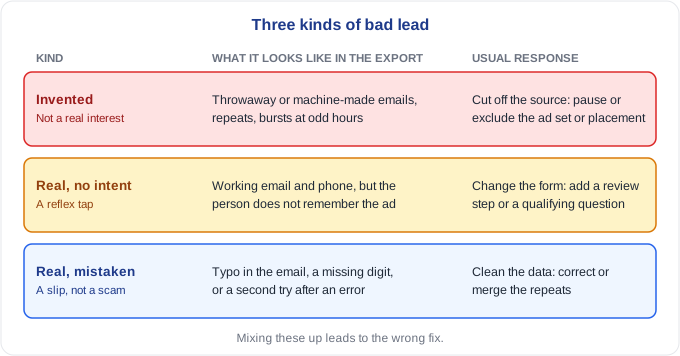
The first kind is invented: throwaway profiles, people paid or rewarded to click, and the occasional script. The second kind is real people with no intent. Their name, email and phone number are genuine, but they never meant to ask for anything. The third kind is real people who made a mistake: a typo in the email, a number with a digit missing, a second submission after the first seemed to fail.
Telling them apart matters because the response differs. Invented leads call for cutting off the source. No-intent leads call for changing the form. Mistakes call for cleaning the data.
Why instant forms create so many no-intent leads
Meta's instant forms are built to be easy. The form opens inside the app with the person's name, email and phone number already filled in from their profile. Submitting takes a tap.
That design works well for volume and badly for intent. A person who taps submit on a prefilled form without reading it has not made a decision. They have done a reflex, and later they may genuinely not remember asking for anything. The contact details are real, so a basic check passes them, and the lead still goes nowhere.
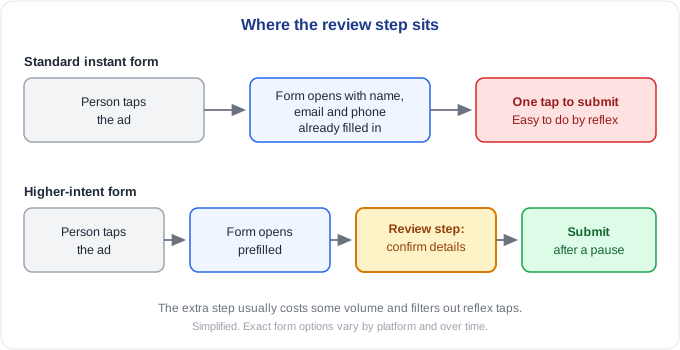
Meta offers a higher-intent form type that inserts a review step before submitting, so the person has to look at their details and confirm them. It adds friction, which usually means fewer leads. The ones that remain are more likely to be people who meant it. Whether that trade is worth it depends on what a lead is worth to you and what a wasted follow-up costs.
What a lead export can and cannot show you
A lead export usually has a name, an email address, a phone number, a submission time, and the names of the form, campaign, ad set and ad it came from. It usually does not have an IP address or a click time, so checks that rely on those, such as shared IP addresses or how long a person took to fill in the form, are not available. What is left is still enough to find a lot.
- Email quality. Look for disposable domains and addresses that look machine-made, such as mostly digits or no vowels. A prefilled form lets a person edit the email before submitting, so junk addresses still appear. The disposable email checklist covers this in more detail.
- Repeats. The same email or phone number appearing more than once, including the same inbox in different forms:
jane.doe@gmail.com,janedoe@gmail.comandjane.doe+7@gmail.comall reach one Gmail inbox. The same phone number attached to different names is worth a closer look. - Name and email that do not agree. A name like "Maria Lopez" with an address like
xk39djq@mail.comis a hint, not proof. A cluster of them is a pattern. - Timing. Leads should arrive in an uneven flow that follows the hours when your audience is awake.
- Concentration. Compare ads, ad sets and campaigns against each other the way you would compare affiliates running the same offer. One ad set with far more junk than the rest points to where the problem is.
Look at the clock
Real audiences follow daily rhythms. Leads climb during the morning, hold through the afternoon, and thin out overnight. A script or a coordinated batch does not care what time it is.
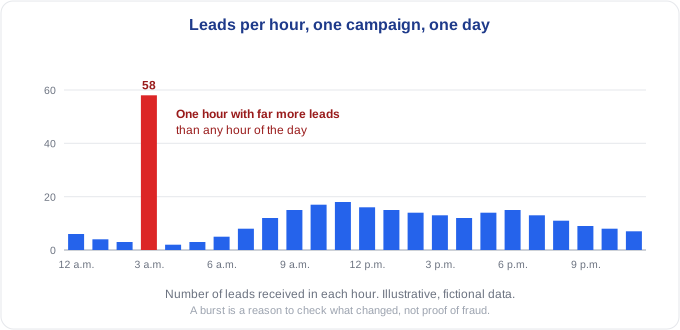
In the example, the campaign has a normal daytime curve and one hour overnight with far more leads than any hour of the day. A burst is not proof of anything. A launch, a budget change or a spike in delivery can produce one. But a burst that does not match any change you made is worth checking, especially if the leads inside it share the other signals above. The bot-lead timing article goes deeper on why timing is so revealing.
Google lead forms and Performance Max
The same problems appear on Google, with a different cause. Performance Max and lead form campaigns optimize toward whatever you tell them counts as a conversion. If every form submission counts, the system will find the easiest sources of submissions, and some of those sources are junk.
The warning sign is a pattern: lead volume jumps, cost per lead falls, and your team finds gibberish names, invalid emails, duplicates and people who never answer. It looks like success in the dashboard and failure in the follow-up.
The fix starts with what you count. Where possible, feed back the leads that turned out to be qualified, not every raw submission, so the system learns what good looks like. Then run the same export checks, because the platform's own numbers will not tell you which submissions were real.
Fix the form before blaming the traffic
If most of your bad leads are real people with no intent, the traffic may be fine and the form may be too easy. A few changes are worth testing one at a time:
- Use a higher-intent form type, so people confirm their details.
- Add a qualifying question that a person who is not interested will not bother to answer.
- Ask for the detail you actually need to follow up, not everything the form can prefill.
Each change that adds effort also removes real leads. Judge it on cost per good lead, not cost per lead.
What to do with a flagged batch
Do not scale spend on a campaign until a sample of its leads has been contacted. Phone or email a small group from the flagged ad set and a small group from a healthy one, and compare how many are reached and remember asking. Log the outcome by campaign and ad set, as "never requested" and "could not reach" separately from "not interested." That log becomes your most reliable fraud signal, because it measures what happened to the lead, not how it looked.
If one ad set, placement or audience keeps producing the bad leads, pause it or exclude it. If the leads are real but low-intent, change the form.
Running this on your own export
Checking a few thousand rows by hand for repeats, odd emails and bursts is slow and easy to get wrong. If you would like to see what your own leads look like, send us a recent lead export and we will run every lead through our checks and email you a report showing which ones look suspicious and why, at no cost. Facebook exports do not carry IP addresses or click times, so some checks cannot run on them, and the report will say which ones did. A flag means a lead deserves a closer look, and the decision stays with you.
The same three-level approach applies to affiliate traffic, and the affiliate fraud detection guide walks through it.
Frequently asked questions
Are Facebook leads fake? Some are, and many are real people with no intent. The export tells you part of the story, and contacting a sample tells you the rest.
How can I tell if a Facebook lead is fake? Look for throwaway or machine-made emails, repeated emails and phone numbers, names that do not match the email, bursts of leads at odd hours, and one ad set producing far more junk than the others.
Does a higher-intent form fix fake leads? It helps with low-intent leads, because it makes people confirm their details. It does not stop invented leads from throwaway profiles, and it usually reduces volume.
Why did my Performance Max leads suddenly jump? A jump in volume with a falling cost per lead can mean the campaign has found an easy source of submissions. Check the leads themselves for gibberish, repeats and invalid contact details before scaling.
Can you check a Facebook lead export for fake leads? Yes, if the export has an email address and a submission time. IP address and click time are usually missing, so some checks cannot run, but duplicates, email quality and patterns can.
A lead is only worth paying for if a real person meant to send it.