October 26, 2026
Time of Day Patterns in Real vs Fake Leads
Why the hour a lead arrives is worth checking
People have routines. They fill in forms on a lunch break, in the evening after work, at the weekend. A real audience therefore produces leads in a recognizable daily shape, with quiet hours overnight and busier ones when people are awake and online.
Software does not follow a routine. A script that submits forms runs whenever it is scheduled to, which can be at three in the morning as readily as three in the afternoon. That does not make time of day proof of anything, since plenty of honest traffic arrives at odd hours. It makes it a cheap check, available in almost any lead export that has a timestamp column, that can tell you whether a source looks like an audience or like a machine.
It sits alongside the other timing checks in this series. The bot lead article is about the gap between a click and a lead. This one is about when in the day, and in the minute, leads arrive.
First, fix the time zone
The most common mistake in timing analysis is also the easiest to avoid. Many exports record timestamps in UTC, or in the server's time zone, not in the audience's. A source whose leads appear to peak at 2 a.m. may simply have an audience in a time zone whose evening is 2 a.m. in UTC.
Before you chart anything:
- Find out which time zone the export uses. Ask the person who set up the tracking, or check how a lead you know the time of appears in the file.
- Convert to the audience's local time. If the audience spans several zones, either split it by region or accept that the picture will be blurrier.
- Watch for daylight saving changes. An hour that disappears or repeats can make a normal day look odd.
Skip this step and you will end up chasing patterns that are really just an offset.
What a real audience looks like, and what a flat one looks like
Count leads per hour of the day, and compare a source with a clear audience against one that arrives at the same pace around the clock.
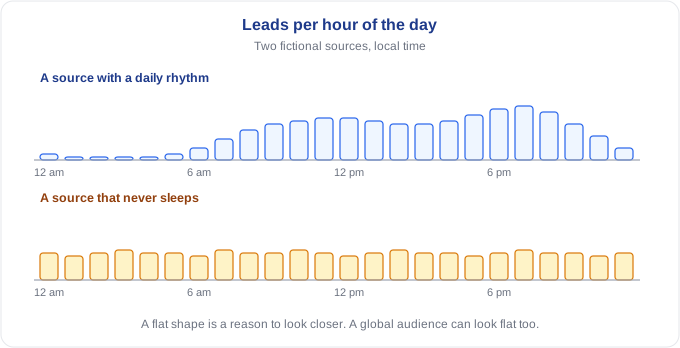
The first chart has a shape. It is quiet in the small hours, builds through the morning and peaks in the evening. The second is nearly flat: almost as many leads at four in the morning as at four in the afternoon. A flat shape is worth a closer look because very few human audiences behave that way, though it can happen with a genuinely global audience or one that includes many shift workers.
The shape you should expect depends on the vertical, the audience and the channel. A source aimed at office workers looks different from one aimed at night-shift staff, so the right comparison is with the same source's own history and with peers on the same offer, not with a general idea of what is normal.
Timing tells and their innocent twins
Several timing patterns are worth knowing, and each has a harmless explanation that you should rule out first.
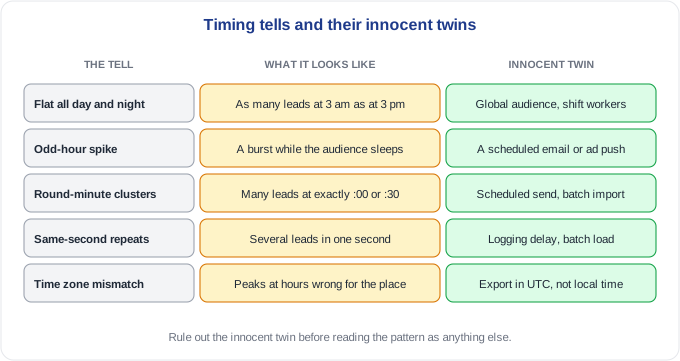
Flat all day and night. Discussed above. The innocent version is a global audience.
An odd-hour spike. A sudden burst when your audience is asleep. A scheduled email, an ad push or a time zone difference often explains it, so check what was sent or switched on.
Round-minute clusters. Many leads arriving at exactly :00 or :30. Scheduled sends and batch imports do this too, which is why the cause needs checking.
Same-second repeats. Several leads stamped within the same second. Logging delays and batch loads can do this, and so can software.
A time zone mismatch. A peak at hours that make no sense for the geography. Most often this is an export in UTC, which takes you back to the first step.
The last point of each row is the important one. Always rule out the ordinary explanation before reading the pattern as anything else.
A way to check a source
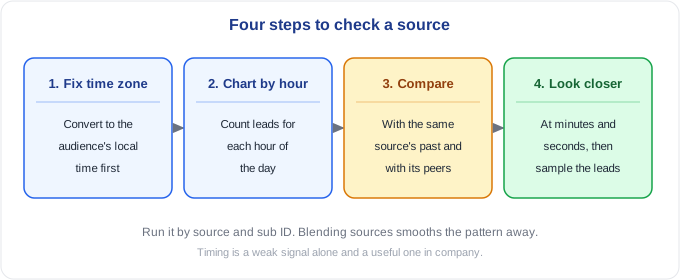
1. Fix the time zone. Convert to the audience's local time before you do anything else.
2. Chart leads by hour. A simple count per hour, for a month or more, is enough. Add day of the week if you can.
3. Compare. Compare the source with its own earlier weeks and with other sources on the same offer. A change in shape within one source is often more telling than a difference between sources.
4. Look closer. If something stands out, look at minutes and seconds, then contact a sample of the leads. The checklist for spotting fake leads explains why outcomes are the strongest evidence.
Use it by source and by sub ID, not for a whole program at once. Blending many sources together smooths out exactly the patterns you are looking for, and the sub-affiliate article shows how one source can hide inside a healthy total.
Combining timing with other signals
Time of day is a weak signal on its own and a useful one in company.
- A flat shape and duplicate-heavy leads and a burst of throwaway emails is a pattern.
- An odd-hour spike and an explained email send is an ordinary Tuesday.
- A round-minute cluster and forms completed in seconds, as the bot lead article describes, deserves a sample.
Put timing next to the other measures in your monthly scorecard, so that a change in shape is seen alongside quality and outcomes. Remember that outcomes take time to appear, as the conversion lag article explains, so do not wait for them before acting on duplicates or obvious scripting.
What to do when something looks off
- Ask the partner. Many timing shapes have a simple cause: a scheduled send, a new campaign, a change in targeting. Ask before you assume.
- Sample the leads. Contact a handful from the odd hours and a handful from the normal ones.
- Do not reject on timing alone. A flag means a source deserves a closer look, and the decision stays with you. Rejections need a reason you can show, as the lead scrubbing guide explains.
- Write what you expect into the agreement. If you require partners to tell you about scheduled sends or campaign changes, say so.
A short checklist
- Confirm the export's time zone and convert to local time.
- Chart leads by hour for each source.
- Compare with the source's history and with its peers.
- Rule out scheduled sends, campaigns and batch imports.
- Look at minutes and seconds if the hour looks odd.
- Combine with other signals before concluding.
- Sample leads and ask the partner.
See the pattern in your own export
If you would like to see which of your own leads show timing patterns, send us a recent lead export and we will run every lead through our checks and email you a report showing which ones look suspicious and why, at no cost. A flag means a lead deserves a closer look, and the decision stays with you.
Frequently asked questions
Do fake leads arrive at night? Some do, because scripts run on schedules, but plenty of real leads arrive at night too. What matters is whether the shape fits the audience, compared with the same source's history and its peers.
What time zone should I use? The audience's local time. Check what the export uses first, since many record UTC or the server's time.
Is a flat hourly pattern always suspicious? No. A global audience or many shift workers can look flat. It is a reason to look closer, not a conclusion.
What are round-minute clusters? Many leads stamped at exactly the same minute mark, such as :00 or :30. Scheduled sends and batch imports can cause them, as can automation.
How much data do I need? Enough that each hour has a meaningful count. A month of leads per source is a sensible start, and more is better for smaller sources.
Time of day is easy to check and easy to misread. Fix the time zone, compare fairly, and let the other evidence decide.